Journey Builder Wait Activities
Journey Builder
Journey Builder is a marketing automation tool, that let you take individuals send them into the marketing automation flow based on those individual actions you can send Messages (Email/SMS/Push), update data in Sales/Service cloud and also you can extend using custom activities.
Wait Activities
Wait Activity is one of the flow control activity in Journey Builder. We need the Wait activity to hold the customers for a certain amount of time before they move to the next activity. Journey Builder continually evaluates customers between activities, ascertaining whether they have engaged with a message, met a goal.
Journey Builder evaluates exit criteria for each contact in the journey when their time in each wait activity expires.
Use of Wait activity
- To identify the customer engagement.
- To identify whether customer met a goal or not.
- To avoid sending multiple communication on the same time.
- To identify the customer status based on the business strategy/Marketing funnel.
- To utilize the exit criteria.
Wait by Duration
This activity hold the contact for a specified amount of time. Wait will start when the contact reaches this activity.
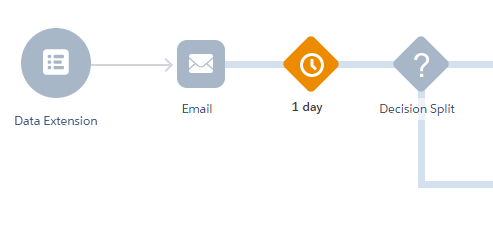
In the above example, wait by duration is configured after the Email activity, subscriber wait for a day before proceeding to the further activities.
Note: Avoid Wait activity that are shorter than an hour, except when testing a journey.
Wait by Attribute
This activity hold the contact for a specified day and time avalable in the contact's date-based attribute value.
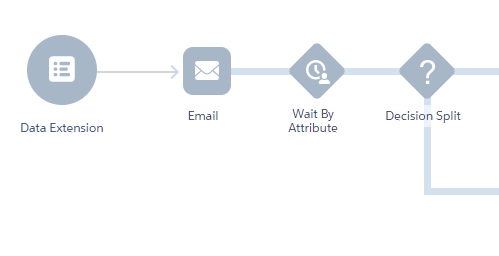
In the above example, wait by attribute is configured which holds the subscriber until the specified date and time value in the attribute.
Note: If the date based attribute value in the database is empty or past date, contact will immediately proceed further to the next activities.
Wait Until Date
This activity hold the contact for a specified day and time configured.

In the above example, wait until date is configured which holds the subscriber until the specified date and time.
Note: If the date based attribute value in the database is empty or past date, contact will immediately proceed further to the next activities.
Best practices for using Wait activities.
- Plan the timing of waits based on your content and the message cadence expectations you want to set.
- Determine the best time of day to reach your customers and an optimal wait duration.
- Avoid unnecessary waits, especially short waits at the beginning of a journey.
- Usage of adjacent Wait activity is not accepted.
Plan wait timing according to your content, and the rhythmic messaging expectations you have in mind for customers.
Consider the optimal wait duration, and the time of day to reach your customers.
Apart from journey testing, avoid wait times less than an hour. Also be mindful to avoid any unnecessary waits, especially at the beginning of a journey.
Journey Builder's Wait By Duration activity can release contacts after a specified time has elapsed.
This option is useful for marketers keen to create a consistent experience for all contacts on the journey.
One can use Wait by attribute based on the value available in Contact data/Journey data. Instead of utilizing Wait by duration activity in the journey.
Wait Until Date is used when Marketing Cloud contacts are held in wait mode until a specified date and time.
Note: Contacts reaching the activity after the specified time or date proceed immediately to the next activity.