Dynamic Sender profile
A Sender profile is required to send an email from the Salesforce Marketing Cloud. This contains "From" and "Reply To" addresses.
We can personalize the "From" and "Reply to" address using Ampscript called Dynamic Sender Profile.
There are many ways to personalize the "from" and "reply to" address. We have described few scenarios below. "From Name" and "From Address" should be specified in any of the below
- Sendable Data Extension.
- Ampscript variable assigned in the Email.
- In the Content Block.
Sendable Data Exension
Data extension contains respective details and utilize those variables in the sender profile in place of "From Name" and "From Address".
Ampscript Function: Assume "fromName" and "fromAddress" fields are available in the sendable Data Extension.
Use verified fallback address to make sure even without having the From Address details in sendableDE will not affect the email send.%%fromName%%
%%fromAddress%%

Ampscript variable assigned in the Email
Using lookup function pull the necessary details from the respective Data Extension and assign it to Ampscript variable OR assign the "From Name" and "From Address" to the Ampscript variable. Use that variable in place of "From Name" and "From Address" in Sender profile.
Ampscript Function: Assume we are assigning the From Name and From Address based on the locale field present in the sendable Data Extension.
Use verified fallback address to make sure even without having the From Address details in sendableDE will not affect the email send.%%[
Set @locale = AttributeValue("Locale")
If not empty(@locale) then
Set @fromName = lookup("MasterDataExtension", "fromName", "Locale", @locale)
Set @fromAddress = lookup("MasterDataExtension", "fromAddress", "Locale", @locale)
Else
Set @fromName = "Brand Specific Name"
Set @fromAddress = "Brand Specific Address"
]%%

In the Content Block:
This is same as above, but here we will create two separate content blocks one for "From Name" and another for "From Address".
Ampscript Function: Assume we are assigning the From Name and From Address based on the locale field present in the sendable Data Extension.
From Name Content Block:
%%[
Set @locale = AttributeValue("Locale")
If not empty(@locale) then
Set @fromName = lookup("MasterDataExtension", "fromName", "Locale", @locale)
Else
Set @fromName = "Brand Specific Name"
]%%
%%=v(@fromName)=%%
From Address Content Block:
%%[
Set @locale = AttributeValue("Locale")
If not empty(@locale) then
Set @fromAddress = lookup("MasterDataExtension", "fromAddress", "Locale", @locale)
Else
Set @fromAddress = "Brand Specific Address"
]%%
%%=v(@fromAddress)=%%
In Sender profile use the below Ampscript code:
Use verified fallback address to make sure even without having the From Address details in sendable DE will not affect the email send.%%=treatascontent(ContentArea(contentAreaID))=%%
%%=treatascontent(ContentArea(contentAreaID))=%%
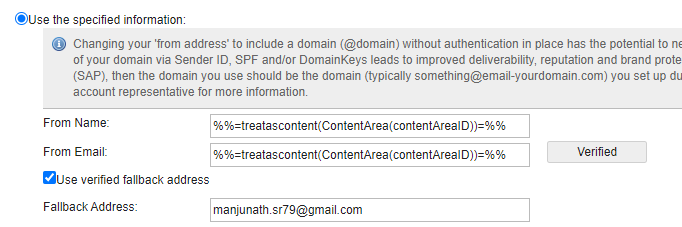
Note: Before using any email address, we have to verify the email domain or the email address else it will pick up the fallback address.
Above examples show how to personalize From Name and From Address. You can apply the same logic for Reply Name and Reply Address.